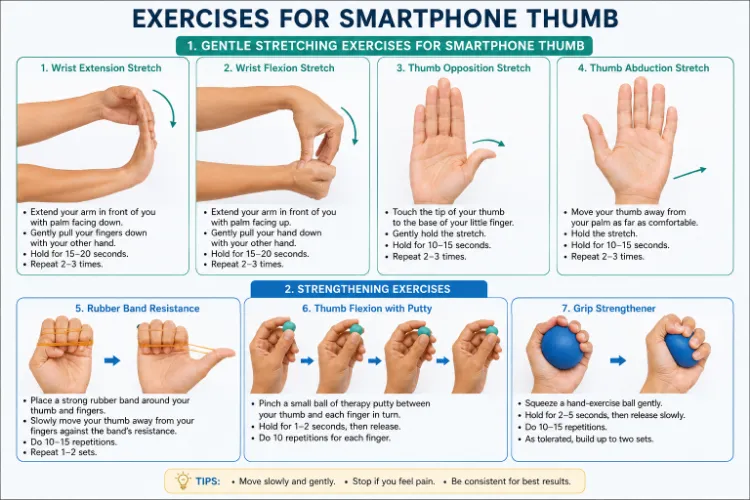
Top Exercises for Smartphone Thumb
Introduction:
The term “text thumb condition,” sometimes known as “smartphone thumb” or “texting thumb,” describes thumb aches, pains, or stiffness caused by frequent use of smartphones or other devices for typing, scrolling, or texting. It occurs when you repeatedly move your thumb in tiny, repetitive motions, which puts stress on the tendons and joints of your thumb.
De Quervain’s tenosynovitis, another name for texting thumb, is a repetitive strain injury caused by frequent phone use that irritates the tendons at the base of the thumb. Thumb soreness, stiffness, edema, and reduced pinch strength are typical symptoms that can make everyday tasks difficult.
Important treatments for thumb texting:
- Modification of activity and rest
- Heat or ice therapy
- Light stretches and then mild strengthening exercises
- Using voice-to-text, switching hands, and taking brief rests are examples of ergonomic modifications.
What Is Texting Thumb?
One kind of repetitive strain injury (RSI) that affects the tendons and muscles surrounding your thumb and wrist is texting thumb. De Quervain’s tenosynovitis is the technical term for one common kind, which is characterized by inflammation of the two major tendons that connect your wrist to your thumb. Symptoms frequently develop gradually, particularly in those who:
- Spend hours using their phone to browse, play games, or send texts.
- Hold their phone firmly with one hand.
- Have occupations or interests that call for careful thumb movements and are middle-aged.
Common Symptoms:
The severity of thumb pain following phone use may be different, but common symptoms include:
- A deep, painful ache near the base of the thumb or on the wrist’s thumb side
- Restricted range of motion and stiffness of the thumb
- Sensitivity while applying pressure to the affected area
- Swelling or a small lump in the area where the wrist and thumb join
- Sensation of snapping or catching when you move your thumb
- Pinching small items is weak or difficult.
- Soreness or pain in the thumb
- Difficulty moving the thumb
- Swelling or stiffness
What Causes Texting Thumb?
- Repeated Motion: The thumb tendons are strained by frequent tapping and swiping.
- Improper Grip on the Phone: Your thumb is forced into strange postures when you clench your phone with one hand.
- Basic Conditions: You may be more at risk for tendon inflammation if you have arthritis or have previously sustained wrist injuries.
- Unbalanced Muscles: Thumb-extending muscles are overused while opposing muscle units are neglected.
How to Avoid Getting Texted Thumb:
Here are a few methods for preventing text thumb:
- When using your smartphone, support your forearms to improve your posture.
- Avoid constantly using your thumb: To text or scroll, hold your phone in one hand and use your index finger in the other.
- Don’t send long messages: Instead of typing every letter, use predictive text and symbols.
- Instead of sending a text message, record a voice message or make a phone call.
- Avoid texting too quickly.
- To monitor your use, set up alerts on your phone.
- Put your hands down and stop using your phone if you experience any pain or stiffness.
Gentle Stretching Exercises for Smartphone Thumb:
Hold each stretch for 20 to 30 seconds after performing it carefully. Repeat two to three times every session, every day.
Wrist Extension Stretch:
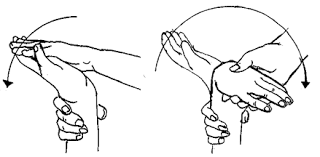
- Maintain a straight back while sitting or standing.
- Maintaining a straight elbow, extend one arm forward to shoulder height.
- Raise your palm.
- Pull the fingers and palm of your opposing hand gently back toward you until the underside of your forearm feels comfortable.
- Avoid bending your elbow and maintain a relaxed shoulder.
- Hold for 15 to 30 seconds.
- Repeat two to three times on each wrist while relaxing.
Advice: The stretch should be mild rather than painful. If you feel tingling, numbness, or severe pain, stop.
Wrist Flexion Stretch:
- With your back straight, take a comfortable seat or stand.
- With your elbow straight, extend one arm straight in front of you.
- Your palm should remain down.
- Gently draw the fingers of your other hand down and in the direction of your body.
- The top and back of your forearm should feel somewhat stretched.
- Don’t push your wrist; instead, maintain a relaxed shoulder.
- For 15 to 30 seconds, hold.
- Repeat 2-3 times on each wrist while relaxing.
Advice: The stretch should be comfortable and mild. If you experience tingling, numbness, or severe pain, stop.
Thumb Opposition Stretch:
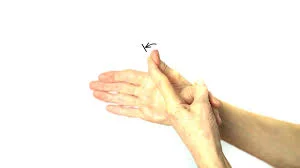
- With your hand relaxed and palm facing up, choose a comfortable seat.
- Move your thumb slowly over your palm in the direction of your little finger’s base.
- Try softly touching the thumb to the little finger.
- Maintain the posture for five to ten seconds.
- Return the thumb slowly to its initial position.
- On each hand, repeat five to ten times.
Advice: Don’t force the thumb; instead, move it softly. If you have severe pain or severe edema, stop.
Thumb Abduction Stretch:
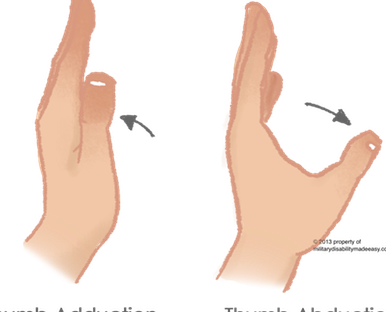
- With your hand relaxed and palm facing up, choose a comfortable seat.
- Hold your fingers together and straight.
- Open your hand by slowly removing your thumb from your palm and fingers.
- As far as it feels comfortable, extend the thumb outward.
- Hold for five to ten seconds.
- Go back to the beginning position slowly.
- On each hand, repeat five to ten times.
Advice: Don’t force the thumb and maintain a relaxed wrist. The movement should be painless and mild.
Strengthening Exercises:
Add small strengthening after pain and edema have subsided (typically after 1-2 weeks of rest and stretching):
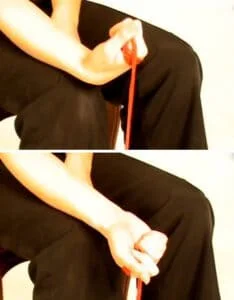
Rubber Band Resistance:
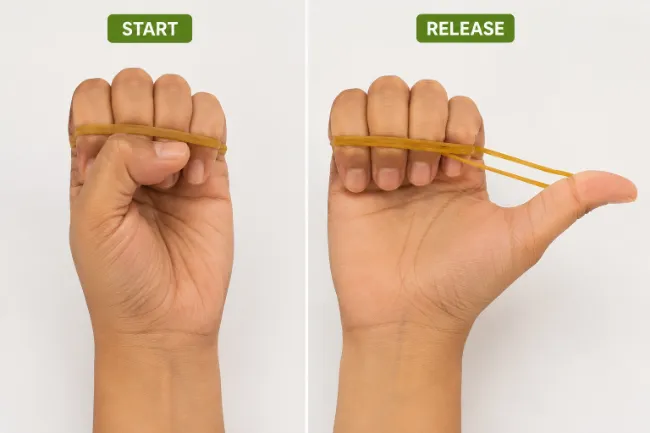
- Put a strong rubber band around the fingers and thumb.
- Maintain a straight wrist and a relaxed hand.
- Against the resistance of the band, slowly slide the thumb away from the fingers.
- At the conclusion of the exercise, hold for a short while.
- Go back to the beginning position slowly.
- Do ten to fifteen repetitions.
- As tolerated, repeat 1-2 sets.
Advice: If you feel tingling, numbness, or pain, stop.
Thumb Flexion with Putty:
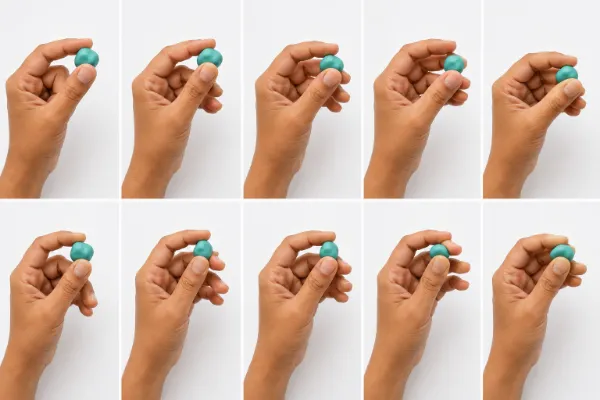
- Take a little ball of soft therapeutic putty.
- Put it in the space between your thumb and index finger.
- Use your thumb and finger to gently pinch the putty.
- For one to two seconds, hold the pinch.
- Slowly release.
- Continue with the ring, little, and middle fingers.
- For every finger, do ten repetitions.
- Move slowly and with a relaxed wrist.
Advice: If you feel pain, stop.
Grip Strengthener:
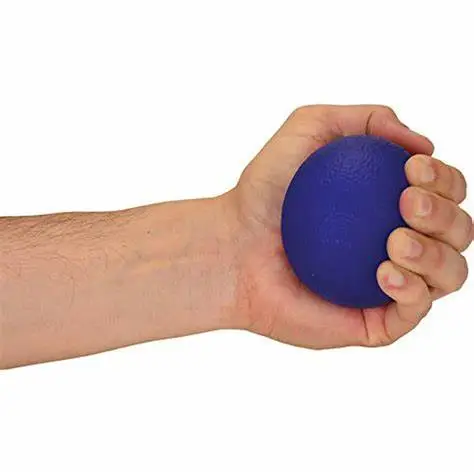
- Comfortably grasp a soft hand-exercise ball in your palm.
- Squeeze the ball slowly with your thumb and fingers.
- Squeeze for two to five seconds.
- Release the grasp gradually.
- Do ten to fifteen repetitions.
- Proceed to two sets as tolerated.
- Maintain a comfortable, balanced wrist posture.
- Don’t squeeze too hard or cause pain.
Ergonomic Tips for Phone Use:
- Switching Hands: Every few minutes, switch which hand is holding the phone.
- Use Two Thumbs: Learn to split characters between both thumbs instead of using only one.
- Voice Input: To save on typing time, use voice commands or dictate texts.
- Telephone Stand: For a lighter grip, utilize a pop socket or place your phone on a stand.
- Take Short Breaks: Put down your phone and move your hands, shake them, or perform wrist circles every 20 minutes.
What steps can be taken to prevent or recover from text thumb?
Do’s:
- Take regular breaks: Every ten to fifteen minutes, stop scrolling or messaging. Give your thumb some time to relax and recover from the repeated movements.
- Stretch your fingers and hands: Throughout the day, perform basic thumb and hand stretches. To stretch the muscles, for instance, slowly draw your thumb backward and hold it there for ten to fifteen seconds.
- Use voice-to-text: To send messages without using your thumb, use your phone’s voice command feature rather than typing everything.
- Alternate hands: When texting, alternate between your left and right hands. This avoids strain on one thumb by distributing the job equally between the two.
- Use larger devices for lengthy tasks: If you’re working on an activity that calls for a lot of typing or reading, such as sending emails or viewing videos, use a bigger device, such as a PC or tablet.
- Let go: Gently hold your phone. Don’t hold on too tightly because this will place additional strain on your thumb and wrist.
- Maintain neutral wrists: When using your phone, try to maintain a straight wrist. Your thumb may become more stressed if you hold your wrist at an uncomfortable position.
- Perform strengthening activities: You can strengthen your thumb and hand muscles by performing basic hand exercises. Squeezing a stress ball or performing resistance exercises with a rubber band, for instance, can be beneficial.
Don’ts:
- Avoid using your thumb for prolonged periods of time without taking a break from texting. Joint and tendon pain and swelling may result from this continuous movement.
- Don’t type too quickly: Your thumb may become more stressed if you type too quickly. To prevent undue strain on the tendons, take your time when typing.
- Avoid using just one thumb: Make an effort to avoid using just one thumb for all of your browsing and texting. Use other fingers or divide the task between both thumbs.
- Stay away from small screens for lengthy tasks: Because you’ll need to make more movements in a smaller area, using small phones for tasks like reading or sending lengthy emails might cause thumb strain. For long tasks, try to use a computer or tablet.
- Avoid holding your phone too tightly because it causes tension in your wrist and hand. Thumb pain might aggravate as a result.
- Stay away from uncomfortable thumb positions: To reach buttons or other regions on the screen, avoid bending or stretching your thumb excessively. Instead of straining your thumb to reach something, move the phone in your hand.
- Don’t ignore pain: Take a break from using your phone for a bit if you start experiencing thumb pain. The illness can get more serious if early symptoms of pain are ignored.
- Use more than one hand when texting: Using only one hand puts additional strain on your thumb. When you can, use both hands, especially for lengthy sentences.
- Avoid prolonged typing sessions: If at all possible, complete long-term activities on a computer that allows you to type with all of your fingers. Break up your texting sessions.
- Avoid applying excessive pressure to the screen: Applying excessive pressure to the screen of your phone can cause needless strain. When using your phone, try to touch it lightly.
How is physiotherapy beneficial for your condition?
- Using methods like ultrasound and cold/heat therapy, physiotherapy helps with text thumb by lowering pain and inflammation.
- Through particular stretching and strengthening exercises, it increases thumb mobility.
- Additionally, joints are mobilized, and appropriate movement is restored by manual therapy.
- In order to avoid further strain, we also offer ergonomic advice.
Conclusion:
- Text thumb, which causes strain, stiffness, and pain in the thumb’s tendons and joints, can be caused by frequent smartphone use.
- To avoid or recover from this, it’s critical to take breaks, use both hands, stretch, and adopt better ergonomic practices such as utilizing larger devices or spoken instructions.
- Physiotherapy may help in recovery by reducing pain, improving range of motion, and offering customized ergonomic advice to avoid strain.
- You can lessen pain and maintain your thumb’s long-term health by following these guidelines.
FAQs:
How can I fix a texting thumb?
To treat a texting thumb, use over-the-counter anti-inflammatory medication, wear a thumb spica splint to immobilize the joint, apply ice for 10 to 15 minutes several times a day, and rest your thumb by limiting phone use for 10 to 14 days.
What are the symptoms of texting thumb?
Due to frequent swiping and scrolling, tech thumb, also referred to as texting thumb or smartphone thumb, causes pain, stiffness, and inflammation in the tendons and joints of the thumb and wrist.
What is the treatment for texting thumb?
To treat a texting thumb, take over-the-counter anti-inflammatory medication, wear a thumb spica splint to immobilize the joint, apply ice for 10 to 15 minutes several times a day, and rest your thumb by reducing phone use for 10 to 14 days.
How to avoid gamer’s thumb?
Take a five-minute break every hour, keep your wrists straight rather than bent, and grasp your controller gently to avoid gamer’s thumb. Stretch your hands regularly, and if you get severe pain, stop playing right away.
What is the best phone grip for hand pain?
Because they let your hand relax instead of forcing you to pinch or press a hard plastic knob, ergonomic finger-slide holders like the G-Hold Ergonomic Phone Holder and elastic strap models like the LoveHandle Standard & Pro are the best phone grips for hand pain.
What are the best exercises for thumb arthritis?
Focus on mild movements that increase joint flexibility and stability without putting undue strain on the base of the thumb to help treat thumb arthritis. Thumb opposition, range-of-motion bends, and isometric C-shape holds are the best exercises.
What are the newest treatment options for thumb arthritis?
The Touch CMC 1 dual mobility prosthesis, a ball-and-socket implant that preserves bone without removing the trapezium bone, is the most recent surgical treatment for advanced thumb basal joint (CMC) arthritis.
References:
- Kloppenburg, M., Kroon, F. P., Blanco, F. J., Doherty, M., Dziedzic, K. S., Greibrokk, E., Haugen, I. K., Herrero-Beaumont, G., Jonsson, H., Kjeken, I., Maheu, E., Ramonda, R., Ritt, M. J., Smeets, W., Smolen, J. S., Stamm, T. A., Szekanecz, Z., Wittoek, R., & Carmona, L. (2018). 2018 update of the EULAR recommendations for the management of hand osteoarthritis. Annals of the Rheumatic Diseases, 78(1), 16–24.
- Grimmer, J., & Stewart, B. M. (2013). Text as Data: The Promise and Pitfalls of Automatic Content Analysis Methods for Political Texts. Political Analysis, 21(3), 267–297.