Microbreak Exercises for Office Workers
Introduction:
Most office workers are aware that they ought to stretch. Because generic advice to stretch every hour doesn’t specify what to do, how long to hold it, or why timing is important, few people really do it. It is fixed by this guide. The precise issue that extended desk sitting causes is addressed by certain stretches, precise timing, and the biomechanical reason behind each.
What Is a Microbreak and How Does It Differ from a Regular Break?
Microbreak exercises are quick, low-effort movements used to break up extended stretches of time spent in one position. They typically last one to three minutes and are most effective when used as frequent position changes rather than as strenuous stretches, a pain reliever, or a substitute for regular exercise.
Unlike traditional rest times or meal breaks, a microbreak is a brief break of 30 to 5 minutes that breaks prolonged static posture. Breaking the neuromuscular holding pattern that causes tension to build up in the neck, shoulders, and lower back during desk work is the goal, not rest.
Office workers’ muscle pain was successfully decreased by taking frequent, brief microbreaks. The process is simple: short position adjustments restore circulation before tension turns into pain, but prolonged static muscle contraction lowers blood flow.
You can take a brief microbreak without stepping away from your workstation or interrupting your work. Equipment is not needed. The constructive intervention is roughly 90 seconds of intentional movement.
When should I take movement breaks during the workday?
Before lunch, after a meeting, after sending a deliverable, or before beginning a new concentration block, take a microbreak at a transition you’ve previously noticed. Waiting until stiffness becomes painful is less effective than using habit signals.
Consider this easy progression:
- Choose a dependable cue, like the conclusion of each meeting.
- Begin each workday with a 2-minute break.
- After a week of repetition, add more reminders.
- Stand and move your ankles for 30 seconds if a complete break is not feasible.
- Creating the ideal interval and ignoring it is not rewarded. An ambitious routine that is perpetually drowsy is inferior to a small break you really take.
Do microbreak exercises replace a workout?
No, while scheduled aerobic and muscle-strengthening activities serve a wider purpose, microbreaks reduce extended periods of inactivity and bring light movement to the day. Use both: take brief breaks while working and engage in activities outside of those breaks that are appropriate for your capacity and health.
Additionally, this avoids a typical failure mode, which is to use every break as a mini-workout. A two-minute reset has grown too complicated for its purpose if it necessitates changing clothes, making room on the floor, or recuperating afterward.
What Are the Most Effective Desk Stretches for Neck and Shoulder Pain?
The three muscle groups most strained by forward head position and computer work are the upper trapezius (neck side bend), levator scapulae (ear-to-shoulder hold), and thoracic spine (sitting extension). These are the three highest-impact neck and shoulder stretches.
Neck Side Bend (Upper Trapezius):
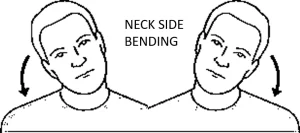
- How: Take a tall seat. Lower your right ear to your right shoulder. Hold for 20 to 30 seconds. Change sides. Don’t push it off; instead, keep the opposing shoulder down.
- Why it works: The upper trapezius travels from the neck to the shoulder, which is why it operates. Sustained elevation is produced by using forward-bending devices. In particular, this stretch lengthens the fibers that screen work has shortened the most.
Seated Thoracic Extension (Spine Reset):
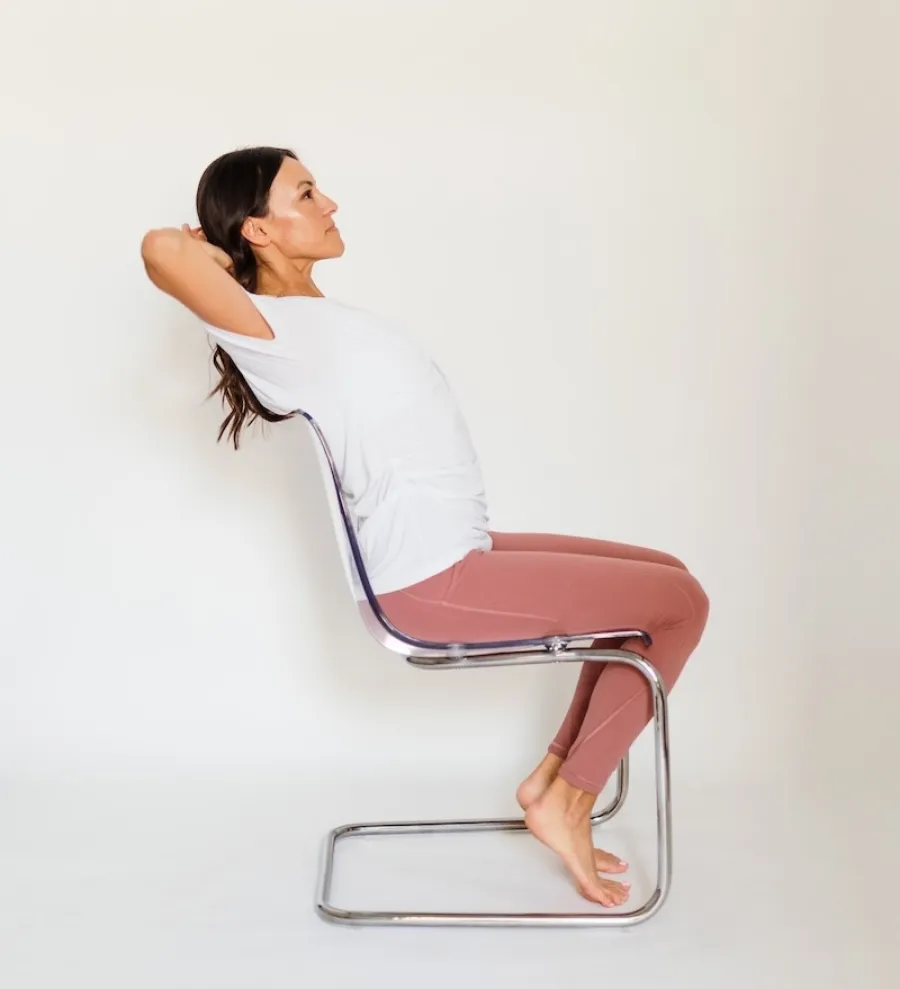
- How: Take a seat in front of the chair. Put your hands behind your neck. Take a breath, look slightly upward, and slowly arch your upper back over the chair back. Hold for fifteen seconds.
- Why it works: The anterior vertebral disc space is compressed by thoracic spine flexion, or hunched posture. During forward head posture, extension decompresses the vertebrae under strain by creating space posteriorly.
Shoulder Blade Retraction:
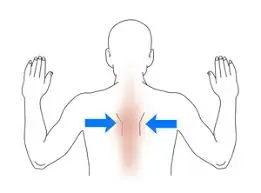
- How: Keep your arms by your sides. Hold your shoulder blades together for five seconds. Let go entirely. Ten times over, repeat.
- Why it works: Prolonged forward position weakens the rhomboids and serratus anterior. This counteracts the imbalance that arises during keyboard activity by activating the posterior chain.
What Stretches Help Lower Back Pain From Sitting?
The two main causes of lower back pain from desk sitting are tight hip flexors (psoas shortening from prolonged hip flexion) and posterior pelvic tilt (lumbar flexion loading discs). Both are addressed by effective stretching.
Seated Cat-Cow (Spinal Mobilization):
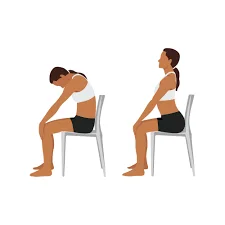
- How: Sit on the chair’s edge with your feet flat. On your knees. Inhale: raise your chest, arch your lower back, and raise your head a little. Exhale by rounding your back, lowering your chin, and flexing your mid-back. Change every 60 seconds.
- Why it is effective: All lumbar vertebral segments are mobilized. Synovial fluid is pumped through facet joints by alternating movement, which reduces stiffness more quickly than a static hold.
Hip Flexor Stretch (Seated):
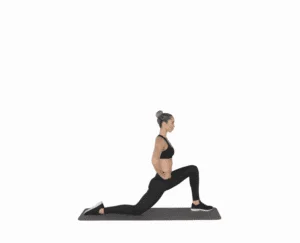
- How: Take a seat on the chair’s edge. Lift your left leg and bring your knee down to the floor. Tuck your pelvis forward a little. Stretch your left hip in front of you. Hold for twenty-five seconds. Change sides.
- Why it works: When sitting, the iliacus and psoas are kept in a shortened position. The lower back pain that frequently follows extended desk work is caused by tight hip flexors pulling the lumbar spine into an anterior tilt when standing.
What Wrist and Hand Stretches Prevent Typing Strain?
Using a keyboard and mouse keeps the wrist in a prolonged extension (dorsiflexion), which compresses the median nerve and loads the carpal tunnel. The prayer stretch (wrist flexion) and finger extension stretch are two stretches that directly address this.
Prayer Stretch:
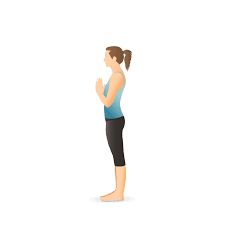
- How: At chest height, press your palms together. Keeping your palms in contact, lower your hands toward your waist until your forearms start to stretch. Hold for 20 seconds.
- Why it works: It directly extends the palmaris longus and flexor carpi radialis, two muscles that keyboard work has chronically shortened.
Finger Extension Spread:
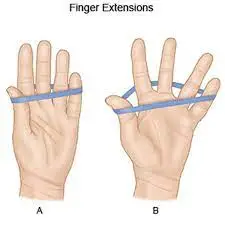
- How: Keep your arms out in front. Extend all of your fingers. Hold for ten seconds. Form a soft fist. Ten times over, repeat.
- Why it works: Opposes the partial flexion that fingers retain when typing. Extension exercises improve circulation to the hand’s small joints.
Benefits:
There are several advantages to exercising, even if it’s only for brief periods of time during the day. They consist of:
- Reduce physical pain: Sedentary workers could benefit from 10 minutes of yoga each day. Participants reported feeling less pain in many parts of their bodies, including their wrists, back, and eyes. Additionally, it enhanced their mental well-being.
- Improve your mood: Studies have shown that short bursts of activity are associated with improvements in mood. Although the majority of research focuses on aerobic exercise, there is some evidence that anaerobic activity, such as weightlifting, can offer comparable advantages.
- Increased focus and efficiency: Reducing sitting time at work has been shown to improve performance, productivity, and engagement. To enhance your wellbeing, it is advised that you only sit for four hours throughout the workday and spend the remaining time standing or doing low-intensity activities.
Other options:
Exercise at your desk may not be feasible depending on how your office is set up, particularly if you’re in proximity to your coworkers.
But there are lots of other methods to make time for exercise at work:
- Regularly use the stairs.
- While on the phone, stroll.
- Think about a standing desk.
- Take a quick stroll during your breaks.
- Consider walking or riding a bike to work if you can.
- Swap your workplace chair for an exercise ball.
- You can work out during your lunch hour if you have some workout clothes at work.
How to stay motivated:
You may find it more difficult than usual to maintain your motivation for your workout if you’re experiencing an especially hectic or stressful day. The following methods can assist you in maintaining your focus:
- To hold each other accountable, set up a fitness challenge with an associate.
- Set weekly and daily objectives for yourself.
- Concentrate on exercises that you enjoy.
- Put your workouts in your calendar ahead of time.
- Reward yourself regularly.
- If you miss one or two days, don’t be hard on yourself.
- While working out, try listening to music that inspires you.
Tips for Implementing Mini-Breaks:
- Plan Your Breaks: Use an app or set a timer to remind yourself to take regular pauses.
- Create a Routine: Make mini-breaks a habit by incorporating them into your regular schedule.
- Pay Attention to Your Body: Keep an eye out for indications of weariness or discomfort, and take a rest when necessary.
- Mix It Up: To keep things engaging and address various facets of your well-being, change up the activities you do during your mini-break.
- Remain Disciplined: By adhering to a predetermined time limit, you can prevent mini-breaks from becoming protracted periods of inactivity.
Conclusion:
You can greatly improve your productivity and well-being at work by including these mini-breaks in your everyday routine. You can revitalize your body and mind by stretching, drinking water, meditating, or going outside for a little while. This will improve your concentration and productivity.
Recall that regular breaks are essential for long-term productivity and general health, not a luxury. Your productivity will increase if you start using these mini-break suggestions right now.
FAQs:
What are the benefits of taking micro breaks?
Microbreaks, which are planned pauses of 30 to 10 minutes, considerably reduce weariness, increase vitality, and enhance general well-being. Your body and brain won’t burn out over extended periods of nonstop work if you take quick, frequent rests.
What are some examples of microbreaks?
Microbreaks are brief, planned pauses that can last anywhere from a few seconds to five minutes. They aim to reduce physical strain, clear mental fog, and improve focus.
What is considered a microbreak at work?
A microbreak is a quick break from work, usually from a few seconds to five or ten minutes, that you take to give your body and mind some relaxation. In contrast to a coffee or lunch break, it breaks up prolonged mental concentration, screen time, or repetitive physical activities to restore energy and reduce fatigue.
How long should a micro break last?
The average duration of a micro break is between 30 seconds and 10 minutes, with most researchers setting a 10-minute upper limit.
Is it good to take breaks while working?
Whether you need a little daily break, a vacation, or a longer career break, it is OK to take a break from work. Stepping away reduces stress, prevents burnout, and improves concentration and physical well-being.
What is a micro break?
Microbreaks, also known as microbreaks, are short, intentional pauses used throughout work or extended tasks to rest the body and reset the mind. These pauses can range anywhere from a few seconds to ten minutes.
Is it beneficial to take microbreaks at work?
During the workday, microbreaks—intentional pauses that range anywhere from 30 seconds to 10 minutes—help you replenish energy, lessen weariness, and reduce stress. They increase energy and lessen fatigue, particularly when performing creative, clerical, or sedentary work.
How long should desk stretches be held?
Holds of 20 to 30 seconds are sufficient for longer tension-based stretches. Thoracic extension is a 15-second mobilization that is a movement rather than a static hold. As 10-repetition workouts, wrist and hand exercises are more effective than holds.
Are there stretches I can do without anyone noticing?
Yes: wrist circles, ankle circles (which are concealed beneath desks), seated thoracic rotation (which resembles turning to inspect something), and side bends of the neck (which resemble deliberate tilting). When arms remain at the sides, shoulder retractions are imperceptible.
References:
- Ergonomics, N. (2025, September 29). Desk stretches and microbreaks: What actually works for office workers. NAVO®. https://navoergonomics.com/blog/stretching-microbreaks-exercises-you-can-do-at-your-desk/
- Wiggle. (2026, July 30). Microbreak Exercises at work: A quiet 2-Minute reset. Wiggle. https://wigglestretch.com/blog/microbreak-exercises-at-work
- Yetman, D. (2026, November 3). 30 office exercises to try right now. Healthline. https://www.healthline.com/health/fitness/office-exercises#staying-motivated
- Wellness, T. (2024, August 5). 10 Mini-Break ideas to improve your productivity at work. Truworth Wellness – India’s Leading Health & Wellness Engagement Company. https://www.truworthwellness.com/blog/10-mini-break-ideas-to-improve-your-productivity-at-work/